
Orca Server
Headless Orca runtime: run a fleet of parallel coding agents in isolated git worktrees on your server and drive them from the Orca desktop, web or mobile app.
Deploy Orca Server on Dokploy
- Install Dokploy on your server if you haven't already.
- In your Dokploy panel, open a project and click Create Service → Template.
- Search for Orca Server and click Create — Dokploy configures domains, environment variables, and volumes for you.
Alternatively, create a Compose service, go to Advanced → Import from Base64, and paste this payload:
ewogICJjb21wb3NlIjogInNlcnZpY2VzOlxuICBvcmNhLXNlcnZlcjpcbiAgICAjIE9yY2EgcHVibGlzaGVzIG5vIGNvbnRhaW5lciBpbWFnZSwgc28gdGhpcyBidWlsZHMgb25lIGZyb20gdGhlXG4gICAgIyBwaW5uZWQgdXBzdHJlYW0gcmVsZWFzZSBBcHBJbWFnZSwgZm9sbG93aW5nIHRoZSBvZmZpY2lhbCBoZWFkbGVzc1xuICAgICMgTGludXggc2VydmVyIGd1aWRlIChkb2NzL3JlZmVyZW5jZS9oZWFkbGVzcy1saW51eC1zZXJ2ZXIubWQpLlxuICAgIGJ1aWxkOlxuICAgICAgYXJnczpcbiAgICAgICAgT1JDQV9WRVJTSU9OOiB2MS40LjIwNVxuICAgICAgZG9ja2VyZmlsZV9pbmxpbmU6IHxcbiAgICAgICAgRlJPTSB1YnVudHU6MjQuMDRcbiAgICAgICAgQVJHIE9SQ0FfVkVSU0lPTlxuICAgICAgICBBUkcgVEFSR0VUQVJDSFxuICAgICAgICBFTlYgREVCSUFOX0ZST05URU5EPW5vbmludGVyYWN0aXZlXG4gICAgICAgIFJVTiBhcHQtZ2V0IHVwZGF0ZSAmJiBhcHQtZ2V0IGluc3RhbGwgLXkgLS1uby1pbnN0YWxsLXJlY29tbWVuZHMgXFxcbiAgICAgICAgICAgICAgYmFzaCBjYS1jZXJ0aWZpY2F0ZXMgY3VybCBmaWxlIGdpdCBqcSBvcGVuc3NoLWNsaWVudCBwcm9jcHMgXFxcbiAgICAgICAgICAgICAgeHZmYiB6bGliMWctZGV2IGxpYmd0ay0zLTB0NjQgbGlicGFuZ28tMS4wLTAgbGliY2Fpcm8yIFxcXG4gICAgICAgICAgICAgIGxpYm5zczMgbGliZ2JtMSBsaWJkcm0yIGxpYmFzb3VuZDJ0NjQgbGliY3VwczJ0NjQgbGlieGtiY29tbW9uMCBcXFxuICAgICAgICAgICAgICBsaWJhdGsxLjAtMHQ2NCBsaWJhdGstYnJpZGdlMi4wLTB0NjQgbGliYXRzcGkyLjAtMHQ2NCBcXFxuICAgICAgICAgICAgICBsaWJ4MTEteGNiMSBsaWJ4Y2ItZHJpMy0wIGxpYnhjb21wb3NpdGUxIGxpYnhkYW1hZ2UxIGxpYnhmaXhlczMgXFxcbiAgICAgICAgICAgICAgbGlieHJhbmRyMiBsaWJ4cmVuZGVyMSBsaWJ4c3MxIGxpYnh0c3Q2IFxcXG4gICAgICAgICAgICAmJiBybSAtcmYgL3Zhci9saWIvYXB0L2xpc3RzLypcbiAgICAgICAgUlVOIGlmIFsgXCIkJFRBUkdFVEFSQ0hcIiA9IGFybTY0IF07IHRoZW4gYXNzZXQ9b3JjYS1saW51eC1hcm02NC5BcHBJbWFnZTsgZWxzZSBhc3NldD1vcmNhLWxpbnV4LkFwcEltYWdlOyBmaSBcXFxuICAgICAgICAgICAgJiYgY3VybCAtZkwgLS1yZXRyeSAzIC1vIC90bXAvb3JjYS5BcHBJbWFnZSBcXFxuICAgICAgICAgICAgICBcImh0dHBzOi8vZ2l0aHViLmNvbS9zdGFibHlhaS9vcmNhL3JlbGVhc2VzL2Rvd25sb2FkLyQkT1JDQV9WRVJTSU9OLyQkYXNzZXRcIiBcXFxuICAgICAgICAgICAgJiYgY2htb2QgK3ggL3RtcC9vcmNhLkFwcEltYWdlIFxcXG4gICAgICAgICAgICAmJiBjZCAvb3B0ICYmIC90bXAvb3JjYS5BcHBJbWFnZSAtLWFwcGltYWdlLWV4dHJhY3QgPi9kZXYvbnVsbCBcXFxuICAgICAgICAgICAgJiYgbXYgL29wdC9zcXVhc2hmcy1yb290IC9vcHQvb3JjYSBcXFxuICAgICAgICAgICAgJiYgY2htb2QgLVIgYStyWCAvb3B0L29yY2EgXFxcbiAgICAgICAgICAgICYmIHJtIC90bXAvb3JjYS5BcHBJbWFnZVxuICAgICAgICBSVU4gdXNlcmFkZCAtLWNyZWF0ZS1ob21lIC0tc2hlbGwgL2Jpbi9iYXNoIG9yY2FcbiAgICAgICAgVVNFUiBvcmNhXG4gICAgICAgIFdPUktESVIgL2hvbWUvb3JjYVxuICAgICAgICBFTlYgUEFUSD0vaG9tZS9vcmNhLy5sb2NhbC9iaW46L29wdC9vcmNhL3Jlc291cmNlcy9iaW46L3Vzci9sb2NhbC9zYmluOi91c3IvbG9jYWwvYmluOi91c3Ivc2JpbjovdXNyL2Jpbjovc2JpbjovYmluIFxcXG4gICAgICAgICAgICBMSUJHTF9BTFdBWVNfU09GVFdBUkU9MVxuICAgICAgICAjIENocm9taXVtIGNhbm5vdCBjcmVhdGUgaXRzIHNhbmRib3ggbmFtZXNwYWNlcyBpbiBhbiB1bnByaXZpbGVnZWRcbiAgICAgICAgIyBjb250YWluZXI7IHRoZSBjb250YWluZXIgaXMgdGhlIGlzb2xhdGlvbiBib3VuZGFyeSBpbnN0ZWFkLlxuICAgICAgICBFTlRSWVBPSU5UIFtcIi9vcHQvb3JjYS9BcHBSdW5cIiwgXCItLW5vLXNhbmRib3hcIl1cbiAgICByZXN0YXJ0OiB1bmxlc3Mtc3RvcHBlZFxuICAgIGluaXQ6IHRydWVcbiAgICBzaG1fc2l6ZTogXCIxZ2JcIlxuICAgIGNvbW1hbmQ6IHNlcnZlIC0tcG9ydCA2NzY4IC0tcGFpcmluZy1hZGRyZXNzICR7T1JDQV9QQUlSSU5HX0FERFJFU1N9ICR7T1JDQV9TRVJWRV9BUkdTOi19XG4gICAgZXhwb3NlOlxuICAgICAgLSA2NzY4XG4gICAgdm9sdW1lczpcbiAgICAgIC0gb3JjYS1ob21lOi9ob21lL29yY2FcbiAgICBoZWFsdGhjaGVjazpcbiAgICAgIHRlc3Q6IFtcIkNNRFwiLCBcImJhc2hcIiwgXCItY1wiLCBcIjogPiAvZGV2L3RjcC8xMjcuMC4wLjEvNjc2OFwiXVxuICAgICAgaW50ZXJ2YWw6IDMwc1xuICAgICAgdGltZW91dDogNXNcbiAgICAgIHJldHJpZXM6IDNcbiAgICAgIHN0YXJ0X3BlcmlvZDogNjBzXG5cbnZvbHVtZXM6XG4gIG9yY2EtaG9tZToge30iLAogICJjb25maWciOiAiW3ZhcmlhYmxlc11cbm1haW5fZG9tYWluID0gXCIke2RvbWFpbn1cIlxuXG5bY29uZmlnXVxuZW52ID0gW1xuICBcIk9SQ0FfUEFJUklOR19BRERSRVNTPWh0dHA6Ly8ke21haW5fZG9tYWlufVwiLFxuICBcIk9SQ0FfU0VSVkVfQVJHUz1cIixcbl1cbm1vdW50cyA9IFtdXG5cbltbY29uZmlnLmRvbWFpbnNdXVxuc2VydmljZU5hbWUgPSBcIm9yY2Etc2VydmVyXCJcbnBvcnQgPSA2NzY4XG5ob3N0ID0gXCIke21haW5fZG9tYWlufVwiIgp9
Configuration
The exact Docker Compose and template configuration this template deploys.
Instructions
Orca Server
Runs orca serve, the headless Orca runtime, following the official
headless Linux server guide.
Orca publishes no container image, so the service is built from the pinned
upstream release AppImage (v1.4.205, amd64 or arm64) on the first deploy.
The first deployment therefore takes a few extra minutes.
The domain serves the runtime WebSocket and its web client. Every client, browser included, connects with a pairing link printed in the logs.
Pair a client
- Open the
orca-serverservice logs in Dokploy. - Copy the
Pairing URL: orca://pair?code=...line printed afterOrca server ready. TheWeb client URLline next to it opens the same runtime in a browser, already paired. - In the Orca desktop app, open Settings > Remote Orca Servers and paste
the link. From a CLI:
orca environment add --name my-server --pairing-code 'orca://pair?code=...'.
The pairing link is a credential: share it only with the client you are pairing. Paired devices are stored in the persistent volume, so clients reconnect after a redeploy or an upgrade without pairing again.
Pair the Orca mobile app
The mobile app needs a mobile-scoped link, which the default link is not.
Set ORCA_SERVE_ARGS=--mobile-pairing in the environment and redeploy: the
logs then print a mobile pairing QR code and link instead of the desktop one.
Scan it from the app, then clear ORCA_SERVE_ARGS and redeploy. Devices
already paired stay paired either way. On a phone, the Web client URL also
works in the browser without this step.
HTTPS
ORCA_PAIRING_ADDRESS is the address advertised to clients. It defaults to
http://<your-domain> (plain WebSocket through Traefik; the pairing channel
itself is end-to-end encrypted). Once HTTPS is enabled on the domain, set it to
https://<your-domain> in the environment and redeploy so clients dial
wss://.
Coding agents
The image ships Orca, git and the Linux libraries it needs, but no coding
agent. Install the agents you use from an Orca terminal on this server; they
land in /home/orca/.local/bin, which is on PATH and persisted in the
orca-home volume together with their credentials, your repositories and
Orca's state (/home/orca/.config).
Example for Claude Code: curl -fsSL https://claude.ai/install.sh | bash.
Upgrade
orca serve never updates itself. To upgrade, change the ORCA_VERSION
build argument in the compose file and redeploy. State lives in the
volume, not in the image, and newer releases migrate it on load.
Logs and secrets
D-Bus and OS keyring errors at startup are expected in a container and
harmless. Without a keyring, Orca stores its secrets unencrypted in the
orca-home volume: treat that volume as sensitive.
Related Templates

Multica
Version: latest
Multica is an open-source managed agents platform for teams. Assign tasks to AI coding agents (Claude Code, Codex, OpenClaw and more) that execute autonomously, report progress, and build reusable skills over time.

OpenDots
Version: 0.1.0-625452e
OpenDots is an open-source template from CopilotKit for always-on AI coworkers: specialist Dots with their own computer, a document workspace with Spaces and pages, chat, calls and Slack, built with CopilotKit and AG-UI.

Paperclip
Version: latest
Paperclip is an open-source control plane for managing teams of AI agents, goals, budgets, tickets, and recurring work.
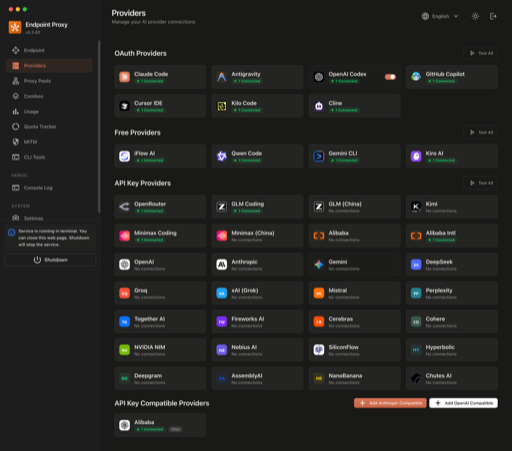
9Router
Version: 0.5.59
Self-hosted AI model router that rotates requests across 40+ providers with automatic fallback, exposing an OpenAI-compatible endpoint for coding agents.

Arche
Version: latest
Arche is a self-hosted AI workspace platform that spawns per-user OpenCode coding containers backed by a shared Knowledge Base. Requires the `arche-internal` external Docker network and `/opt/arche/{kb-content,kb-config,users}` directories on the host before deploy. Images are linux/amd64 by default; override `ARCHE_WEB_IMAGE` and `ARCHE_WORKSPACE_IMAGE` to the `-arm64` tag variants for ARM64 hosts.

bolt.diy
Version: latest
Prompt, run, edit, and deploy full-stack web applications using any LLM you want!
Self-host Orca Server in minutes
Dokploy is a free, open source deployment platform. Deploy Orca Server and 567+ other templates on your own infrastructure with a single click.