Manufacturing technology deployment that keeps plants moving
Deploy plant-floor apps, integration services, dashboards, and internal tools without relying on unmanaged servers or manual release steps. Dokploy gives manufacturing technology teams a repeatable platform for controlled deployments.
Deploy with one line of code
Release operational software without disrupting production teams
Manufacturing software supports people, equipment, logistics, and production workflows. Ship changes through a controlled deployment layer with clear environments, monitoring, logs, and rollback options.
Deploy factory apps without server handoffs
Run dashboards, internal tools, APIs, and service interfaces from a platform your team can manage.
Isolate plant, line, and region environments
Create projects and environments around sites, regions, product lines, or operational systems.
Connect Git and Docker workflows
Dokploy supports Git providers, Docker, Docker Compose, Nixpacks, Buildpacks, and custom Dockerfiles.
Support integrations and internal APIs
Deploy background services, internal APIs, and multi-container systems with Docker Compose, useful for applications that connect operational systems.
Monitor workloads across sites
Track logs, deployments, server metrics, and application health. Platform teams can support plant software without manually checking every host.
Roll back failed releases quickly
Use rollback and deployment history when a release affects an internal tool or operational workflow. Teams can recover faster while they investigate the issue.
Modern plant software without unmanaged servers
Manufacturing teams often run critical internal software on local servers, one-off scripts, and legacy handoff processes. Dokploy creates a more consistent deployment model without forcing teams into a heavy platform build.
Manual plant deployments
- Apps may depend on local server knowledge or individual operators.
- Release steps can differ by site, team, or vendor.
- Logs, domains, backups, and rollbacks may be handled manually.
- Developers may need server access to ship basic changes.
- Production support becomes harder as internal tools multiply.
Dokploy for manufacturing
- Applications deploy through a controlled platform with familiar workflows.
- Projects and environments can map to sites, teams, or production systems.
- Git, Docker, Docker Compose, and database services are supported.
- Monitoring, logs, backups, and rollback options support day-to-day operations.
- Remote servers and multi-server management help teams grow across locations.
From manufacturing app repository to site-ready release
Dokploy helps manufacturing technology teams make releases more repeatable. The same workflow can support a plant dashboard, integration service, internal API, or operations tool.
Create the site environment
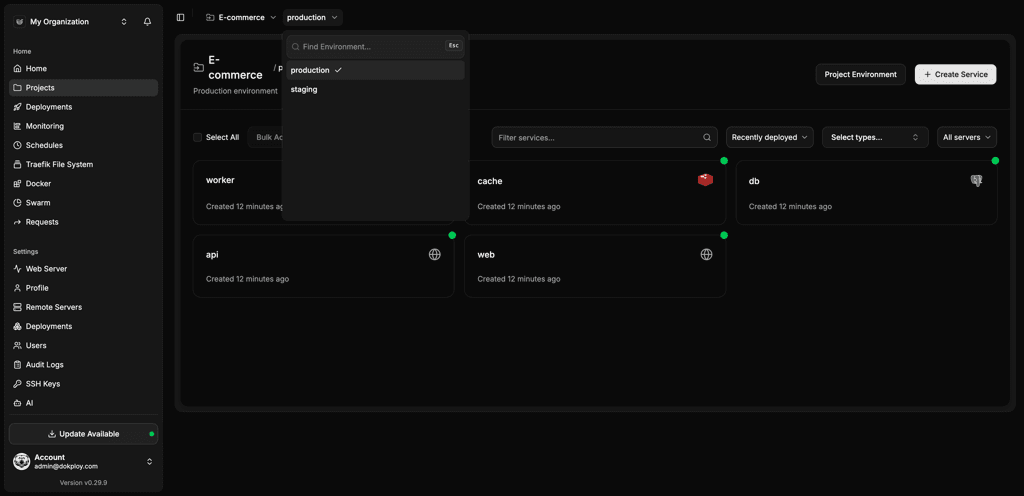
Set up a project for a plant, operational system, integration service, or regional team. Add development, staging, and production environments as needed.
Create project → Add environment → Assign team
Connect the application
Connect a Git repository, Docker image, Docker Compose file, or supported build method. Dokploy can automate deployment when approved changes are pushed.
Select provider → Choose service → Configure build
Deploy safely
Release the app to a controlled environment before production. Teams can review logs, variables, domains, and service settings before promotion.
Deploy staging → Validate → Promote
Monitor and recover
Watch logs and metrics after deployment, then use rollback options if a release affects an operational workflow. Keep the deployment record tied to the service.
Monitor → Alert team → Roll back if needed
Built for plant-floor tools and industrial platforms
Dokploy gives manufacturing technology teams a way to standardize application deployment without removing flexibility.
Teams can run single-service apps, Docker Compose stacks, databases, and internal APIs through the same platform.
Remote servers and multi-server management help teams support workloads across sites or infrastructure zones.
Self-hosted and cloud deployment options let organizations choose a model that fits their operational and IT requirements.
Platform details at a glance
| Area | What Dokploy supports |
|---|---|
| Deployment methods | Git, Docker, Docker Compose, Nixpacks, Heroku Buildpacks, and custom Dockerfiles |
| Industrial workflows | Site environments, preview releases, webhook deploys, scheduled jobs, and service templates |
| Access control | Owner, Admin, and Member roles, with custom Enterprise roles |
| Infrastructure options | Self-hosted Dokploy, Dokploy Cloud, remote servers, and multi-server management |
| Databases | PostgreSQL, MySQL, MongoDB, Redis, and MariaDB |
| Operations | Monitoring, logs, backups, rollbacks, domains, MCP, and deployment history |
Manufacturing technology deployment FAQs
Unlock Your Deployment Potential with Dokploy Cloud
Say goodbye to infrastructure hassles—Dokploy Cloud handles it all. Effortlessly deploy, manage Docker containers, and secure your traffic with Traefik. Focus on building, we'll handle the rest.
Create an account