Healthcare deployment software for safer clinical apps
Deploy patient-facing apps, clinical operations tools, and healthcare technology in environments your IT teams can govern. Dokploy supports private deployment in healthcare with self-hostable infrastructure, access control, and review workflows.
Deploy with one line of code
Release healthcare technology without exposing infrastructure
Healthcare technology deployment needs a balance between speed and control. Dokploy enables developers to publish apps efficiently while IT teams keep infrastructure, access, and operational visibility in one place.
Deploy clinical apps inside controlled environments
Run patient portals, care team tools, internal dashboards, and service APIs in environments managed by you with self-hosted Dokploy.
Protect access with SSO and roles
Separate administrator, developer, and reviewer permissions. Enterprise teams can add SSO, custom roles, and audit logs for stronger operational control.
Review changes before they affect care teams
Use preview deployments or staging environments to test changes before they reach staff or patients. Teams can check the running application, not just a branch or ticket.
Support full-stack healthcare tools
Deploy frontends, APIs, background services, and Docker Compose stacks. We also support common databases used in healthcare technology projects.
Monitor applications and servers centrally
View logs, deployments, and monitoring from one platform. IT teams get a clearer view of application health without manually checking each server.
Ship AI-powered tools securely
Build AI sandboxes where even your non-technical team members can test vibe-coded and AI-enabled software in a secure, controlled environment.
Private deployment in healthcare on one platform
Dokploy gives teams a more consistent way to release and operate healthcare software, rather than a mix of internal servers, cloud projects, vendor portals, and one-off deployment scripts.
Ad hoc healthcare deployments
- Different teams may use different hosting accounts and release scripts.
- Clinical tools can be hard to monitor after launch.
- Access reviews depend on the process behind each app.
- Rollbacks and backups may not be planned consistently.
- Internal apps can become difficult for IT teams to support.
Dokploy for healthcare deployment
- Applications deploy through one governed platform.
- Teams can use Git, Docker, Docker Compose, and supported databases.
- Enterprise controls include SSO, custom roles, audit logs, and whitelabeling.
- Preview deployments help teams review changes before release.
- Monitoring, logs, backups, and rollbacks sit closer to the deployment workflow.
From healthcare app repository to governed release
Dokploy gives healthcare technology teams a repeatable path from code to a running application. Developers can keep working from Git while IT teams manage the release environment.
Create the application environment
Set up a project for a patient portal, internal tool, integration service, or care operations app. Use separate environments for review, staging, and production.
Create project → Add environment → Assign team
Connect the codebase
Connect a Git provider or bring a Docker-based configuration. Dokploy supports common deployment methods, so teams can match the workflow to the application stack.
Select provider → Choose repository → Set branch
Test before release
Deploy changes into a preview or staging environment. Product owners, IT, and clinical operations teams can review the running application before it is promoted.
Open preview → Review service → Approve release
Deploy with visibility
Publish the approved version, then monitor logs, deployments, and server metrics. Rollback options help teams respond if a release needs to be restored.
Deploy → Watch logs → Roll back if needed
Built for patient-facing apps and internal healthcare platforms
Dokploy gives healthcare technology teams a practical deployment layer for apps that need tighter operational control.
Teams can deploy services from Git or Docker, manage domains and environments, and keep logs, monitoring, and releases close to the application.
For organizations with stricter infrastructure needs, Dokploy can be self-hosted. Teams that want Dokploy to manage the control plane can use Dokploy Cloud while connecting their own servers for application workloads.
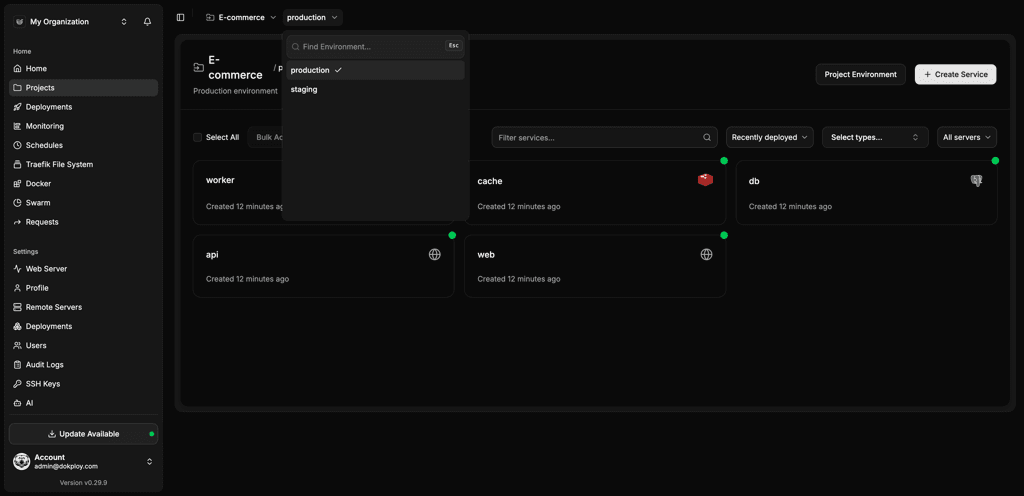
Platform details at a glance
| Area | What Dokploy supports |
|---|---|
| Deployment methods | Git, Docker, Docker Compose, Nixpacks, Heroku Buildpacks, and custom Dockerfiles |
| Healthcare workflows | Preview deployments, staging environments, webhook deploys, and production releases |
| Access control | Owner, Admin, and Member roles, with custom Enterprise roles |
| Governance options | Enterprise SSO, audit logs, whitelabeling, and role-based access control |
| Databases | PostgreSQL, MySQL, MongoDB, Redis, and MariaDB |
| Operations | Monitoring, logs, backups, rollbacks, remote servers, MCP, and multi-server management |
Healthcare deployment software FAQs
Unlock Your Deployment Potential with Dokploy Cloud
Say goodbye to infrastructure hassles—Dokploy Cloud handles it all. Effortlessly deploy, manage Docker containers, and secure your traffic with Traefik. Focus on building, we'll handle the rest.
Create an account