Deployment software for higher education so students launch safely
Give students a real deployment experience securely. Dokploy provides IT and academic technology teams with a controlled platform for student apps, course projects, and internal teaching tools.
Deploy with one line of code
Let students ship real apps without creating shadow IT
Students need to deploy, test, and share the apps they've built. In Dokploy, higher education institutions get a deployment platform that keeps app publishing inside an environment your teams can control.
Give students a sandbox
Create environments where students can deploy applications from Git, Docker, or Docker Compose without needing direct server access. Students get valuable practice, while you keep the platform boundary clear.
Keep access under institutional control
Use roles and permissions to separate student, instructor, and administrator responsibilities. Enterprise teams can go further with custom roles, single sign-on, and audit logs for a tighter governance model.
Connect to the tools students already use
Dokploy supports Git-based deployment workflows across providers such as GitHub, GitLab, Bitbucket, and Gitea. Students can move from repository to running app without learning a vendor-specific release process.
Support full-stack coursework
Deploy frontends, APIs, background services, and databases from the same platform. Dokploy supports common databases, including PostgreSQL, MySQL, MongoDB, Redis, and MariaDB.
Review work before it reaches production
Preview deployments help students and teaching staff test changes in isolated environments before merging. It's a practical way to support code reviews, group projects, and assessment workflows.
Scale from one course to many departments
Start with a single course sandbox, then expand across labs, bootcamps, research groups, or internal innovation programs. Dokploy supports multi-server management and remote servers, and the platform grows with demand.
Student app hosting without unmanaged cloud sprawl
Giving every student a separate cloud account creates cost, security, and support problems. Dokploy gives institutions a cleaner model: one deployment layer, controlled access, and a familiar developer workflow.
General cloud accounts
- Students may need broad infrastructure permissions.
- Costs can spread across unmanaged accounts.
- Instructors have limited visibility into deployed work.
- IT teams inherit inconsistent security and cleanup processes.
- Each course may develop its own release workflow.
- The less control you have, the more of a security risk to your deployment process.
Dokploy for higher education
- Students deploy inside institution-managed environments.
- Admins can manage projects, users, services, and servers centrally.
- Teams can use Git, Docker, Docker Compose, and supported databases.
- Enterprise options include SSO, custom roles, audit logs, and whitelabeling.
- Courses can reuse the same deployment model across cohorts.
- Students and educators can link AI tools through the MCP.
From coursework repository to live sandbox app
With Dokploy, teaching teams turn deployment into part of the learning journey. Students can go from code to a working URL through a repeatable workflow.
Create the course environment
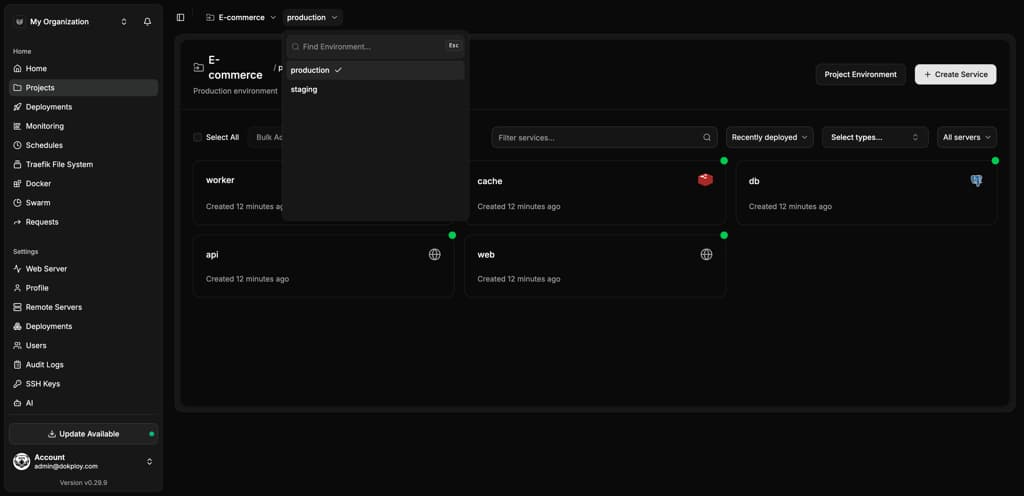
Set up a project for the module, class, or department. Use separate environments for cohorts, assignments, or assessment stages.
Create project → Add environment → Invite members
Connect the repository
Students or instructors connect a Git provider and select the relevant branch. Dokploy can trigger deployments through webhooks when changes are pushed.
Select Git provider → Choose repository → Set branch
Choose the deployment method
Use Nixpacks, Heroku Buildpacks, Dockerfile, or Docker Compose. Keep introductory projects simple while supporting advanced software engineering modules.
Pick build type → Add build command → Configure port
Publish to a controlled URL
Assign a custom or generated domain where students can demo their apps. Dokploy includes domain management through the UI, reducing the need for manual reverse proxy configuration.
Add domain → Deploy → Share app URL
Built for teaching, governed by IT
Dokploy helps institutions offer a modern software delivery experience without pushing infrastructure responsibility onto students.
Students can deploy the kinds of projects they're already building: web apps, APIs, database-backed tools, internal prototypes, and capstone projects.
Administrators can decide whether to use Dokploy Cloud's managed control plane or self-host Dokploy on university-managed infrastructure.
Platform details at a glance
| Area | What Dokploy supports |
|---|---|
| Deployment methods | Git, Docker, Docker Compose, Nixpacks, Heroku Buildpacks, and custom Dockerfiles |
| Git workflows | GitHub, GitLab, Bitbucket, Gitea, and webhook-based auto deploys |
| Access control | Owner, Admin, and Member roles, with custom Enterprise roles |
| Governance options | Enterprise SSO, audit logs, and whitelabeling |
| Databases | PostgreSQL, MySQL, MongoDB, Redis, and MariaDB |
| Operations | Monitoring, logs, backups, rollbacks, preview deployments, and remote server management |
Deployment software for higher education FAQs
Unlock Your Deployment Potential with Dokploy Cloud
Say goodbye to infrastructure hassles—Dokploy Cloud handles it all. Effortlessly deploy, manage Docker containers, and secure your traffic with Traefik. Focus on building, we'll handle the rest.
Create an account