Pharmaceutical deployment software for controlled releases
Deploy research tools, lab applications, quality systems, and internal platforms in environments your technology teams can govern. Get a repeatable deployment layer with access control, review workflows, logs, monitoring, and rollback options.
Deploy with one line of code
Release pharma software with more control and less manual work
Pharmaceutical teams need to support research, quality, digital operations, and internal tools without letting deployments fragment. Dokploy creates a single deployment workflow that teams can adapt to different applications.
Deploy lab and research tools privately
Run internal applications, data tools, dashboards, and service APIs on infrastructure that matches your policy. Choose self-hosted Dokploy or Dokploy Cloud.
Govern releases with roles and audit logs
Use permissions to separate developers, reviewers, and administrators. Enterprise teams can add SSO, custom roles, audit logs, and whitelabeling.
Review validation environments before merge
Use preview deployments and staging environments to test changes before they reach production users. Review the running service while prepping for release.
Support databases and service stacks
Deploy Docker Compose applications, APIs, background services, and supported databases from the same platform.
Keep environments consistent
Create repeatable projects for research, quality, lab operations, digital products, and internal platforms.
Restore and roll back critical services
Use backups, deployment history, and rollback options when a release needs to be recovered, so teams can respond faster.
Regulated software delivery without fragmented infrastructure
Pharmaceutical technology environments often include research tools, vendor systems, internal apps, and controlled workflows. Dokploy gives teams one platform for releasing and operating software safely.
Fragmented pharma deployments
- Teams may use different servers, scripts, or cloud accounts.
- Review environments can be inconsistent between applications.
- Access, logs, backups, and rollback paths may not be standardized.
- Internal tools become harder to support as teams grow.
- Deployments depend too heavily on individual infrastructure knowledge.
- Separate tools means more work to maintain security.
Dokploy for pharmaceutical deployment
- Applications deploy through a repeatable platform.
- Projects and environments can support research, quality, and digital operations.
- Git, Docker, Docker Compose, and supported databases are available.
- Enterprise controls include SSO, custom roles, audit logs, and whitelabeling.
- Monitoring, logs, backups, and rollbacks support ongoing operations.
- Create sandboxes where you can deploy safely, even AI-coded software.
From pharma software repository to controlled release
Pharmaceutical technology teams can move from code to running service through a clear release path. Each step keeps deployment practical for developers and visible to platform owners.
Create the controlled environment
Set up a project for a lab tool, research app, quality workflow, or internal platform. Use separate environments for review, validation, staging, and production.
Create project → Add environment → Assign roles
Connect the service
Connect a Git repository, Docker image, or Docker Compose file. Dokploy supports flexible build types so each app can use the deployment model that fits its stack.
Select provider → Configure build → Set variables
Review the running app
Deploy changes to preview or staging so reviewers can test the service before production. Logs and deployment history help keep the release path visible.
Open preview → Review logs → Approve release
Deploy and operate
Release the approved version, monitor health, and use rollback or backup options if the service needs to be restored. Keep operations close to the deployment record.
Deploy → Monitor → Restore if needed
Built for R&D, quality, and digital operations teams
Dokploy gives pharmaceutical organizations a flexible deployment layer for internal software.
Teams can deploy research platforms, lab tooling, dashboards, APIs, and multi-service apps without creating a separate process for every system.
The platform supports both self-hosted and cloud control-plane models, which gives infrastructure and compliance stakeholders room to choose how closely the deployment platform should sit inside the organization’s own environment.
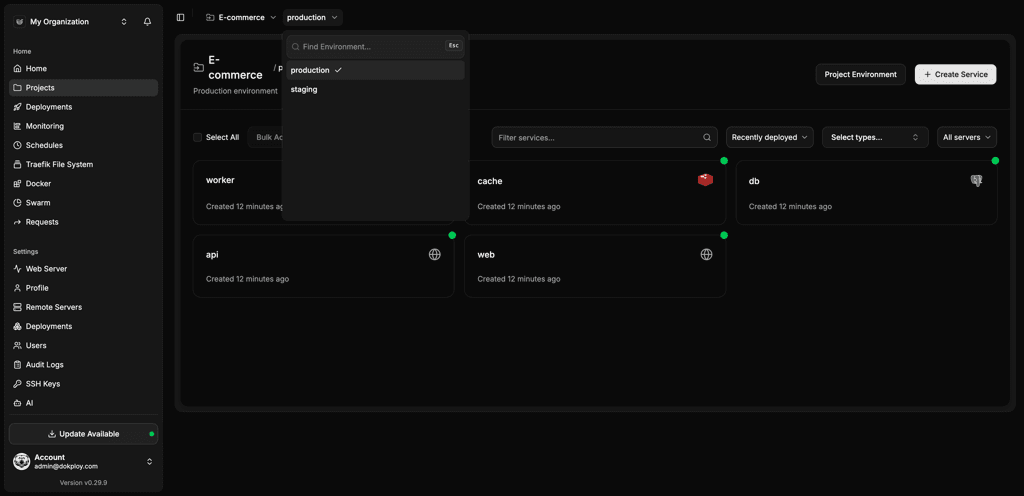
Platform details at a glance
| Area | What Dokploy supports |
|---|---|
| Deployment methods | Git, Docker, Docker Compose, Nixpacks, Heroku Buildpacks, and custom Dockerfiles |
| Pharma workflows | Review environments, staging releases, webhook deploys, templates, and deployment history |
| Access control | Owner, Admin, and Member roles, with custom Enterprise roles |
| Governance options | Enterprise SSO, audit logs, whitelabeling, and role-based access control |
| Databases | PostgreSQL, MySQL, MongoDB, Redis, and MariaDB |
| Operations | Monitoring, logs, backups, rollbacks, preview deployments, MCP, and remote server management |
Pharmaceutical deployment software FAQs
Unlock Your Deployment Potential with Dokploy Cloud
Say goodbye to infrastructure hassles—Dokploy Cloud handles it all. Effortlessly deploy, manage Docker containers, and secure your traffic with Traefik. Focus on building, we'll handle the rest.
Create an account