A deployment agency platform for faster client launches
Launch client websites, SaaS products, internal tools, vibe-coded software, and campaign apps without rebuilding the deployment process every time. Dokploy gives agencies a repeatable release platform with previews, domains, logs, databases, and client-ready governance.
Deploy with one line of code
Ship client projects faster without messy hosting handoffs
Agencies need a deployment model that works across clients, stacks, domains, and production requirements. Dokploy helps teams move from repo to live app with less manual setup and more visibility after launch.
Launch client projects from Git
Connect GitHub, GitLab, Bitbucket, Gitea, generic Git, Docker, or Docker Compose. Teams can deploy new client apps without writing custom server instructions each time.
Separate each client into projects
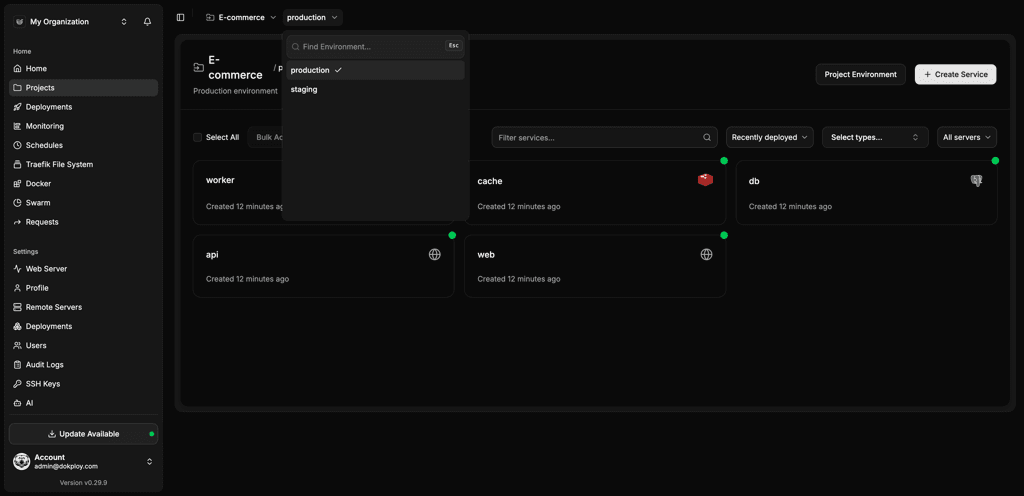
Organize services by client, brand, product, or retainer. Clear project structures make it easier to manage access, environments, and ownership as your portfolio grows.
Preview work before client signoff
Use preview deployments to show working application changes before they’re merged. Account teams and clients can review the app in context.
Manage domains and production releases
Configure domains, environment variables, logs, and deployment history from one platform. Keep launch tasks close to the service, not spread across tools.
Enable AI workflows with the MCP
Connect your AI agent to Dokploy with the MCP, so team members and clients can manage deployments with prompts, or even autonomously.
Whitelabel for a single brand experience
Enterprise whitelabeling can help agencies present a branded deployment experience, while giving clients more security.
Client deployments without a patchwork of hosting accounts
Dokploy gives your software building and deployment agency a single operating model to build, review, launch, and support client apps.
Traditional agency deployment tools
- Every client can use a different provider or server setup.
- Launch checklists depend on whoever configured the project.
- Preview links, logs, domains, and backups sit in different places.
- Support teams need to learn each client’s hosting account.
- Handoffs can create confusion over access and ownership.
Dokploy for agencies
- One platform for client projects, environments, services, and servers.
- Git and Docker workflows support a wide range of project stacks.
- Preview deployments make sign-off easier before production release.
- Domains, logs, monitoring, backups, and rollbacks are managed close to the app.
- Enterprise options support SSO, custom roles, audit logs, and whitelabeling.
From client repository to production launch
Dokploy helps agencies turn deployment into a repeatable client delivery process. New projects can follow the same workflow, even when the technology stack changes.
Create the client project
Set up a project for the client, campaign, product, or retainer. Add environments for development, preview, staging, and production as needed.
Create project → Add environments → Invite team
Connect the repository
Connect the client app from Git or configure a Docker-based deployment. Dokploy can trigger releases from webhooks when changes are pushed.
Select provider → Choose repository → Set branch
Share a preview
Deploy a preview environment so account teams and clients can review the live app before release. Keep feedback tied to the version under review.
Open preview → Share URL → Collect signoff
Launch and support
Assign domains, deploy to production, and monitor logs and metrics after launch. Rollbacks and deployment history help support teams respond quickly.
Add domain → Deploy → Monitor
Built for agencies managing many client apps
Dokploy gives agencies a cleaner way to manage multiple apps, clients, and release workflows.
Teams can deploy from common Git providers, use Docker Compose for more advanced projects, and keep client services visible after the initial launch.
For larger agencies, Enterprise features add SSO, custom roles, audit logs, and whitelabeling, making it easier to give internal teams and client stakeholders the right level of access without handing over raw server credentials.
Platform details at a glance
| Area | What Dokploy supports |
|---|---|
| Deployment methods | Git, Docker, Docker Compose, Nixpacks, Heroku Buildpacks, and custom Dockerfiles |
| Client workflows | Preview deployments, environments, templates, domains, and webhook-based auto deploys |
| Access control | Owner, Admin, and Member roles, with custom Enterprise roles |
| Agency options | Enterprise SSO, audit logs, whitelabeling, and client-friendly role management |
| Databases | PostgreSQL, MySQL, MongoDB, Redis, and MariaDB |
| Operations | Monitoring, logs, backups, rollbacks, remote servers, MCP, and multi-server management |
Deployment agency platform FAQs
Unlock Your Deployment Potential with Dokploy Cloud
Say goodbye to infrastructure hassles—Dokploy Cloud handles it all. Effortlessly deploy, manage Docker containers, and secure your traffic with Traefik. Focus on building, we'll handle the rest.
Create an account