Software deployment tools for governments
Deploy citizen-facing services, case management systems, and internal department tools without handing infrastructure control to an outside vendor. Dokploy gives teams a self-hosted platform for private deployment and consistent oversight.
Deploy with one line of code
Ship public sector software without losing infrastructure control
Government agencies need to ship software while keeping data and infrastructure under direct control. With Dokploy, teams release from Git and Docker, while IT manages access and audit trails.
Host inside your own infrastructure
Run citizen services and departmental apps on servers you control. Self-host the full platform, including air-gapped installs – data can't leave agency-owned infrastructure.
Connect Git workflows to governed deployments
Deploy from GitHub, GitLab, Bitbucket, Gitea, generic Git, Docker, or Docker Compose. Development teams keep familiar workflows while IT maintains oversight.
Separate departments with roles and environments
Create projects around agencies, departments, or programs. SSO, custom roles, and audit logs keep access aligned with agency policy.
Review changes before public release
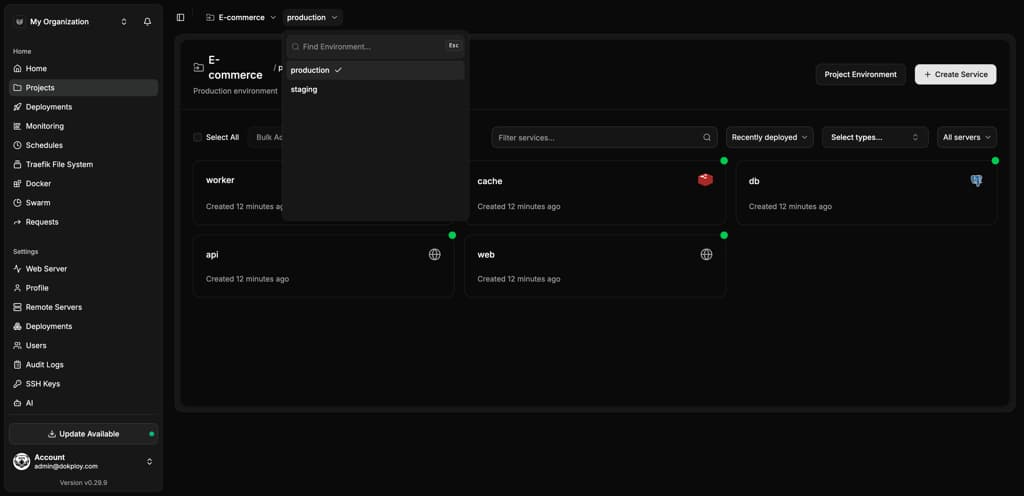
Use preview and staging environments to test updates before they reach citizens or staff. Reviewers can check the running application, not just a code diff.
Monitor services across departments
Track application health, server metrics, logs, domains, and deployments from one platform, so IT teams have consistent visibility.
Power your AI deployment process
Build AI sandboxes where non-technical staff can test vibe-coded software in a secure, controlled environment, without touching production systems.
Government software deployment without losing data control
Commercial cloud accounts can become difficult to govern across departments, citizen-facing services, and compliance-sensitive systems. Dokploy centralizes the deployment layer while teams stay productive.
Generic cloud deployment
- Teams may depend on infrastructure and data centers outside their control.
- Release processes vary between departments and vendors.
- Access reviews, logs, and backups can sit in different tools.
- Non-technical staff need IT support to test even simple AI-generated tools.
- Security teams have limited visibility into unsanctioned or shadow IT apps.
Dokploy self-hosted
- Applications deploy inside self-hosted or air-gapped infrastructure your agency controls.
- Admins manage projects, users, services, and servers centrally.
- Enterprise options include SSO, custom roles, audit logs, and whitelabeling.
- Non-technical staff can test AI-built tools inside a sandboxed environment.
- IP allowlisting keeps internal systems off the public internet.
From government app repository to controlled release
Dokploy makes release management a clear, repeatable workflow. Developers can ship from their repositories, while IT teams keep the environment, access model, and release path consistent.
Create the governed environment
Set up a project for a citizen service, internal tool, or department platform. Use separate environments for development, review, staging, and production.
Create project → Add environment → Assign owners
Connect the repository
Connect a Git provider or bring a Docker-based deployment. Dokploy can trigger deployments through webhooks when approved changes are pushed.
Select provider → Choose repository → Set branch
Review before release
Deploy changes into a preview or staging environment for IT, security, and department review. Stakeholders can test the running service before it reaches citizens or staff.
Open preview → Check logs → Approve release
Deploy and monitor
Promote the release, watch logs and metrics, and use rollback options if the service needs to be restored. The full deployment history stays tied to the service.
Deploy → Monitor → Roll back if needed
Built for government IT and departmental teams
Government IT teams often end up stitching together one-off servers, scripts, and vendor tools per department.
Dokploy replaces that patchwork with a single deployment layer, so oversight bodies get one consistent audit trail instead of piecing records together from a dozen systems, and smaller departments can ship without waiting on a custom platform build.
Platform details at a glance
| Area | What Dokploy supports |
|---|---|
| Deployment methods | Git, Docker, Docker Compose, Nixpacks, Heroku Buildpacks, and custom Dockerfiles |
| Government workflows | Review environments, staging releases, webhook deploys, and deployment history |
| Access control | Owner, Admin, and Member roles, with custom Enterprise roles |
| Governance options | Enterprise SSO, audit logs, whitelabeling, IP allowlisting, and air-gapped self-hosted deployment |
| Databases | PostgreSQL, MySQL, MongoDB, Redis, and MariaDB |
| Operations | Monitoring, logs, backups, rollbacks, preview deployments, MCP, and remote server management |
Government software deployment FAQs
Unlock Your Deployment Potential with Dokploy Cloud
Say goodbye to infrastructure hassles—Dokploy Cloud handles it all. Effortlessly deploy, manage Docker containers, and secure your traffic with Traefik. Focus on building, we'll handle the rest.
Create an account